
Have you ever left home for work, reached the train station, and suddenly panicked thinking, “Did I turn off the bathroom geyser?” Or maybe you wake up shivering at 3:00 AM in the middle of the night because the AC has turned your bedroom into a freezer, and you can’t find the remote in the dark.
Upgrading to a smart AC or a smart geyser costs tens of thousands of rupees. Fortunately, you don’t need to replace your old appliances to make them smart. A simple ₹800 to ₹1,000 16A (Ampere) Smart Plug sits between your wall socket and your heavy appliance, giving you complete control over your phone—no matter where you are.
After testing the most popular models for connectivity, app stability, and heating under heavy loads, here are the 3 best 16A smart plugs in India for 2026.
Quick Comparison: Top 16A Smart Plugs
| Smart Plug Model | Max Load Capacity | Energy Monitoring | App Used | Best For |
|---|---|---|---|---|
| Wipro 16A Wi-Fi Smart Plug | 16A (Up to 3520W) | Yes | Wipro Next Smart Home | Overall Reliability & Energy Tracking |
| Qubo 16A Smart Plug (by Hero) | 16A (Up to 3600W) | Yes | Qubo App | Fast Pairing (BLE + Wi-Fi) & Build Quality |
| TP-Link Tapo P110 (16A) | 16A (Up to 3680W) | Yes | Tapo App | Best App Experience & Compact Size |
1. Wipro 16A Wi-Fi Smart Plug: The Trusted All-Rounder
When it comes to Indian household electricals, Wipro is a name almost everyone trusts. Their 16A smart plug is one of the highest-selling smart home gadgets in the country for a good reason—it simply works without fuss.
- Real-World Performance: Whether you connect it to a 1.5-ton window/split AC or a 25-liter storage water heater, the plug handles the load comfortably without getting alarmingly hot.
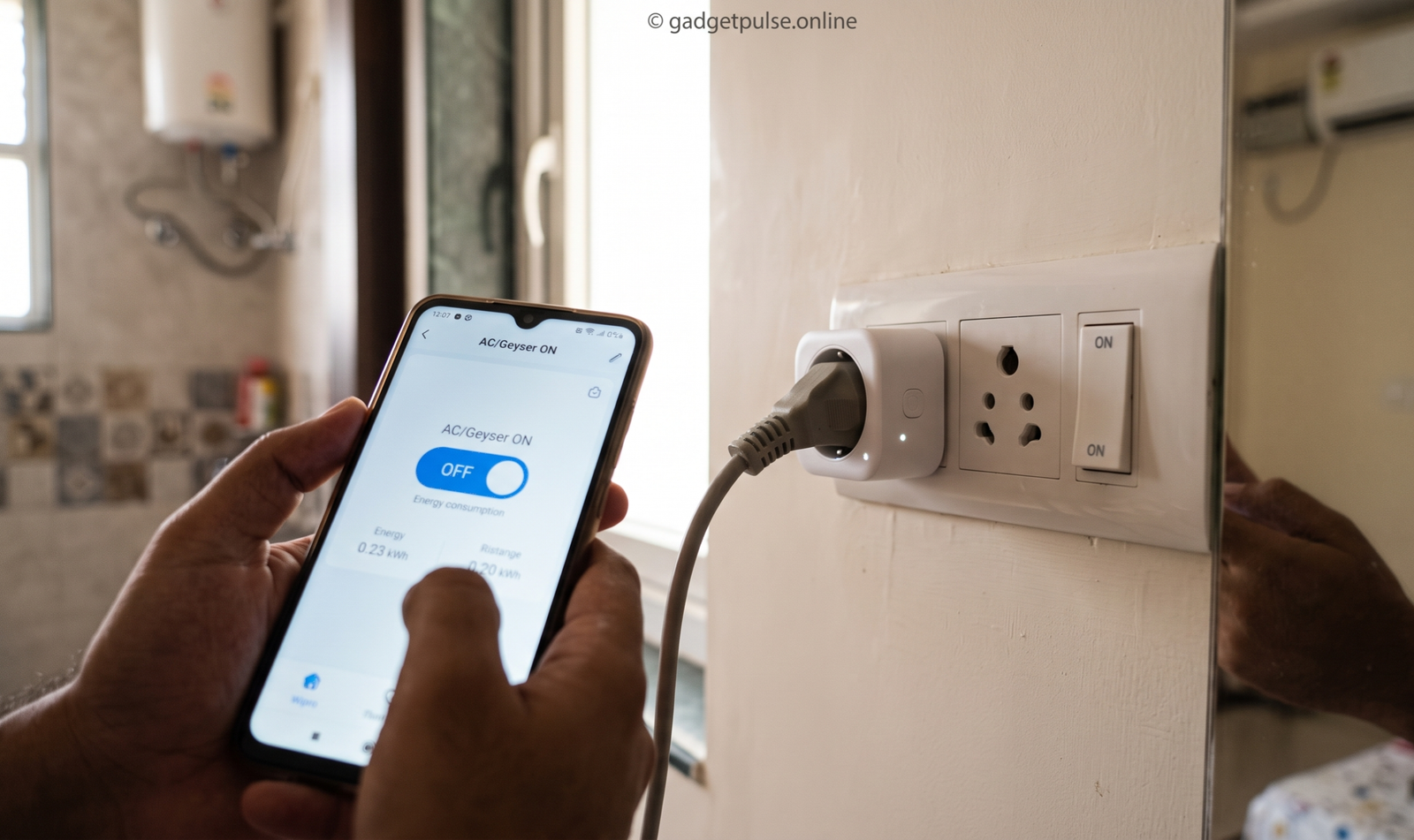
- Energy Monitoring: This is the standout feature. Inside the Wipro Next app, you can see exactly how many units (kWh) your AC or geyser consumes daily and monthly. If your electricity bill has been shocking you lately, this feature alone will help you catch the culprit.
- Smart Scheduling: You can set a timer so your geyser automatically turns on at 6:30 AM and turns off at 7:00 AM every day. You walk into a warm shower without ever touching a switch or wasting electricity.
Things to Keep in Mind: The plug is slightly bulky, so if your wall switchboard has another socket right next to it, it might block the adjacent switch slightly.
2. Qubo 16A Wi-Fi + BT Smart Plug: The इंडियन Powerhouse
Backed by the Hero Group, Qubo has built a massive reputation in the Indian smart home market (especially with their security cameras and dashcams). Their 16A smart plug fixes one of the biggest headaches of budget smart plugs: connection drops.
- Dual Connectivity (Wi-Fi + Bluetooth): Most smart plugs struggle during the initial setup. Because the Qubo plug uses Bluetooth Low Energy (BLE) alongside 2.4GHz Wi-Fi, your phone detects it within seconds during setup. Even if your internet goes down temporarily, you can still toggle the switch via Bluetooth when you are in the same room.
- Safety First: Built with flame-retardant polycarbonate material, it handles sudden voltage fluctuations better than generic Chinese rebrands. It also lets you set a “Power-On State”—meaning if there is a power cut while your AC is running, you can configure the plug to stay OFF when electricity returns, protecting your compressor from sudden surges.
- Voice Control: Works seamlessly with both Amazon Alexa and Google Assistant. Just say, “Alexa, turn off the bedroom AC,” and it happens instantly.
Things to Keep in Mind: The Qubo app sends occasional promotional notifications, which you might want to turn off in your phone settings.
3. TP-Link Tapo P110 (16A): The Best Software Experience
TP-Link knows networking better than almost anyone else, and their Tapo P110 brings that rock-solid wireless stability into a smart plug. While Wipro and Qubo rely on modified Tuya-based ecosystems, TP-Link uses its own dedicated Tapo app, which is easily the cleanest and fastest app on this list.
- Rock-Solid Connection: Once connected to your home Wi-Fi, the Tapo P110 rarely goes offline. Response times when tapping the button on your phone are near-instant, even when you are operating it using mobile data from your office.
- Intuitive Energy Charts: The Tapo app breaks down your power usage into super clean graphs and even lets you enter your local per-unit electricity tariff to calculate the exact rupee cost of running your appliance.
- Away Mode: Going on a family vacation? The Away Mode randomly turns connected lamps or appliances on and off to make it look like someone is home.
Things to Keep in Mind: It is often priced ₹100 to ₹200 higher than Wipro or Qubo, but the superior app experience makes it worth the extra spend.
Wait: Do You Need a 10A or a 16A Smart Plug?
Before you click buy on Amazon or Flipkart, check the size of your wall socket. This is the #1 mistake buyers make:
- 16A (Large Pins): Used for high-wattage appliances like Air Conditioners (AC), Water Geysers, Microwaves, Room Heaters, and Washing Machines. The pins are thick and spaced wider apart.
- 10A / 6A (Small Pins): Used for low-power devices like TVs, Phone Chargers, Wi-Fi Routers, Mosquito Repellents, and Pedestal Fans.
Never use a 10A plug with a converter for an AC or Geyser—it will melt the plug and cause a short circuit. Always buy a dedicated 16A smart plug for heavy appliances.
3 Important Things to Know Before Buying
- Requires 2.4GHz Wi-Fi: None of these smart plugs work on 5GHz Wi-Fi networks. If you have a dual-band router at home, make sure you connect the plug to the 2.4GHz band during setup.
- The “AC Remote” Catch: For geysers, motors, and room heaters, a smart plug works completely on its own. However, for certain modern Split ACs, turning on the main power switch only puts the AC into “Standby” mode (you still need to press the power button on the remote). Check if your AC has an “Auto-Restart” feature—if it resumes cooling automatically after a power cut, a smart plug will work 100% seamlessly with it!
- Wall Switch Stays ON: For the smart plug to stay connected to Wi-Fi, your physical wall switch must stay in the ON position at all times. You control the power flow via the app or the small physical button on the side of the smart plug.
Final Thoughts
If you want a reliable, set-and-forget smart plug with great software, go for the TP-Link Tapo P110 (16A). If you want value for money and often deal with unstable power cuts, the Wipro 16A or Qubo 16A will serve your home brilliantly while helping you shave a few hundred rupees off your monthly electricity bill.
Last updated: October 2026
Frequently Asked Questions
Q1. Can a 16A smart plug handle a 1.5-ton or 2-ton Split AC?
Yes. Most 16A smart plugs support up to 3500W–3680W of load, which is more than enough for a 1.5-ton or 2-ton AC.
Q2. Does a smart plug consume a lot of electricity when kept on standby?
No. A smart plug uses less than 1 to 1.5 Watts on standby to keep its Wi-Fi chip active, which barely adds ₹10–₹15 to your yearly electricity bill.
Q3. Will the smart plug schedules work if my home Wi-Fi goes down?
In most modern plugs like Tapo and Qubo, once a schedule or timer is saved, it is stored locally on the plug’s chip, so daily timers usually work even if the internet drops temporarily.
Q4. Can I use a smart plug without a Wi-Fi router using my mobile hotspot?
Yes, you can set it up using a second phone’s 2.4GHz hotspot, though you won’t be able to control it remotely once you take that hotspot phone out of the house.
Q5. Does using a smart plug reduce the electricity bill?
The plug itself doesn’t magically lower appliance wattage, but by using schedules and countdown timers (for example, auto-shutting the geyser after 20 minutes or turning off the AC at 4 AM), you prevent over-usage and easily save 10% to 20% on monthly bills.